
Claude Design – Anthropic AI's design tool for creating prototypes, presentations, and UI mockups
Artificial intelligence is no longer transforming only content creation and software development, but is also increasingly becoming part of the daily workflows of design and UX teams. AI tools can help with summarising research findings, creating UX copy, writing documentation — or even generating interactive prototypes.
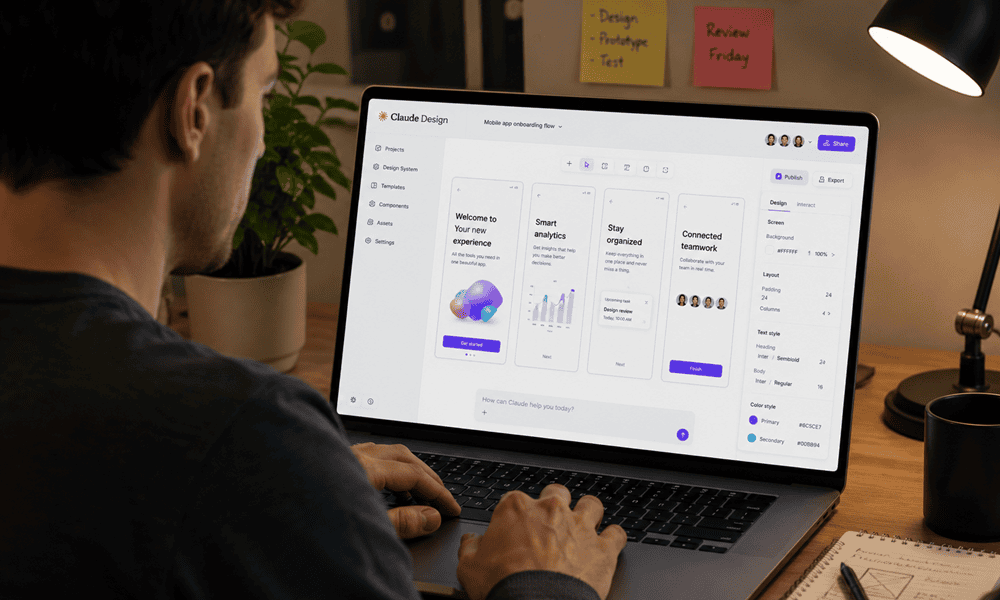
Claude Design allows both professional designers and less experienced users to create high-quality visual content based on natural language instructions. It's not just an AI assistant, but a complete creative workspace for producing prototypes, presentations, UI mockups, and other visual projects. Claude AI is particularly useful for design work in workflows that require rapid prototyping, visual iteration, and impressive, easily shareable outputs.
Specifically, what can Claude Design actually do? How does it differ from Figma, Canva, or the standard Claude chat? And who should try it out? We will explore these questions in our article.

What is Claude Design?
Claude Design is a standalone product from Anthropic – it's not just another feature of the usual Claude chat. The difference is important: while the chat provides text responses, Claude Design creates actual visual output that can be exported, shared, and even handed over to a developer.
The product is built on Claude Opus 4.7, Anthropic's most powerful AI model, and is currently available in research preview for Claude Pro, Max, Team, and Enterprise subscribers.
What can Claude Design be used for? – Key use cases
Claude Design isn't built for just one task. Design and product development teams are already using it in a variety of workflows.
AI prototyping
From static mockups, shareable, interactive prototypes can be quickly created for feedback gathering and user testing – without requiring developer cycles for every modification. The AI prototype creator workflow is particularly useful when rapid iteration and presentable versions are needed.
Product wireframes and UI mockups
Product managers can outline feature flows which can then be refined with designers or handed over to Claude Code for implementation. AI-powered UI mockup creation can be done in a fraction of the time of traditional wireframing – and the results can be shared immediately.
Design system AI-based application
During the initial setup, Claude reads the team's development and design files, then builds a unified visual system using the company's colours, typography, and UI elements. Subsequent projects automatically use this system, ensuring that the final materials are consistently in line with the company's brand identity. Multiple design systems can be managed simultaneously.
Pitch decks and presentations
A presentation that fits the brand's visual identity can be created from a brief outline in minutes, and it can be exported in PPTX format or sent to Canva for further editing. This is particularly useful for startups, founders, and sales teams.
Marketing materials
Landing pages, campaign visuals, and social media content can also be created with Claude Design. Designers can then refine these further, while the creation of initial versions is significantly accelerated.
Experimental prototyping
Code-based prototypes can also be created with sound, video, shaders and 3D elements. This feature may be of interest primarily to teams working on experimental or innovative projects.
How does Claude Design work?
A workflow follows a natural creative logic: the initial idea is followed by refinement, and finally export or developer handover.
Importing content
The starting point can be:
- text prompt
- uploaded image
- documents (DOCX, PPTX, XLSX)
- link to a codebase
With the web capture function, elements can also be incorporated directly from web pages, bringing prototypes much closer to the appearance of the real product.
Fine-tuning step by step
The finished design can be modified with direct comments, text editing or via sliders generated by Claude. Spacing, colours and layouts can be adjusted in real time.
If something is not suitable, you just need to indicate it, and Claude will apply the modifications to the entire design.
Collaboration and export
Designs:
- can remain private
- can be shared across the organisation
- can be transferred with editing permissions
This way, teams can collaborate on the same project together, with Claude's assistance.
Export options:
- internal URL
- folder
- Canva
- PPTX
- standalone HTML
Handover to Claude Code
If a design is ready for implementation, Claude automatically prepares the package required for developer handover, which can be forwarded with a single instruction to Claude Code.
This step previously took many teams days – but now it can be completed almost instantly.
Claude Design vs. Figma, Canva and traditional UX prototyping tools
It's important to clarify: Claude Design is not a „Figma killer” or a Canva successor. The goal isn't to replace traditional design tools, but rather to quickly visualise and prototype ideas.
Claude Design tends to complement existing workflows rather than replace them.
Aspect | CLAUDE DESIGN | Figma | Canva |
|---|---|---|---|
Visual output from natural language | yes | no | partly |
Interactive prototype with AI | yes | yes (manual) | no |
Design system automatic application | yes | manual | no |
Export to Canva | yes | no | – |
Claude code handover | built-in | no | no |
Professional vector editing | no | yes | partly |
Claude Design vs. Claude chat – what's the difference?
Many people are asking what the difference is between Claude Design and the standard Claude chat interface for design tasks.
Aspect | CLAUDE DESIGN | CLAUDE (CHAT) |
|---|---|---|
Visual output | yes – prototype, slide, mockup | no |
UX documentation | yes | excellent |
UX copy | yes | excellent |
Design system automatic application | yes | no |
Interactive prototype | yes | no |
Export (PPTX, PDF, Canva) | yes | no |
Claude code handover | built-in | manual |
Real-world results in practice
It's not just Anthropic that claims the system works – early users are also reporting concrete results.
For instance, at the Brilliant educational platform team in America, the most complex pages that required over 20 prompts in other AI prototyping tools were completed with just 2 prompts in Claude Design. The Claude Code integration also significantly simplified the transition from prototype to production code.
The product managers at the Datadog software company have gone so far as to create a working prototype from a raw idea before the end of a meeting – which previously could have meant a week-long iteration process.
How much does Claude Design cost? – Availability and pricing
Claude Design does not require a separate subscription: it is available as part of your existing Claude plan, within your subscription limits. Additional usage can be activated if limits are exceeded.
Available packages:
- Claude Pro
- Claude Max
- Claude Team
- Claude Enterprise
In an enterprise environment, the feature is switched off by default and must be enabled by administrators.
Try it here: claude.ai/design
Who is Claude Design for?
Claude Design and AI-based UX prototyping primarily bring the most benefits where rapid ideation, visual design, and continuous refinement are required.
This can be particularly useful:
- for product managers, looking to quickly visualise feature ideas
- for designers, who want to try out multiple creative directions at once
- for startups and sales teams, who want to create presentations quickly
- for marketers, who put together landing pages and campaign materials
- for developers, who are working with Claude Code and require structured developer handoffs
Limitations that are worth being aware of
Like all experimental products, Claude Design has current limitations.
- Notes can occasionally disappear before Claude processes them, so for more important edits, it's worth pasting the feedback into the chat as well.
- Larger development projects or entire repositories can cause slowdowns and browser issues, so it's advisable to only specify the relevant subdirectories to the system.
- In an enterprise environment, administrator authorisation is mandatory within organisational settings.
FAQ – Claude Design and AI Design Tools
As Claude Design is still a new AI design tool, many practical questions arise concerning its use, sharing, subscriptions, and data security. Below, we have compiled the most common questions and answers.
Does Claude Design work offline?
No, an internet connection is required – Claude Design is a cloud-based service, and generation and design system synchronisation also take place on the server.
How many projects can be managed at once?
There is no strict project number limit, but subscription frameworks also apply to the use of Claude Design. If someone is working on many projects concurrently, it is worth paying attention to the possibility of extra usage.
Can material created in Claude Design be shared with external partners?
Yes, but only internal link sharing is available by default. For external sharing, PDF, PPTX, or Canva export is the recommended route.
Is there a mobile version?
Currently, it's a browser-based interface optimised for desktop use – a dedicated mobile application is not yet available.
How safe is it to upload codebase and design files?
Anthropic's enterprise security standards apply. Enterprise subscribers should check data handling and retention policies in administrator settings before uploading sensitive files.
Conclusion
Claude Design is one of Anthropic's most exciting new AI tools, showcasing the direction creative and UX workflows are heading in the coming years. The aim isn't to replace designers, but rather to make the process from idea to finished visual asset quicker, smoother, and far less time-consuming.
Whether for rapidly visualising feature flows, compiling pitch decks, creating UI mockups, or exploring multiple design directions in parallel, Claude Design can accelerate work across numerous areas. Furthermore, built-in design systems, Claude Code integration, and flexible export options allow finished materials to integrate more easily into existing workflows.
Although the product is currently only available as a research preview, it is already clear that it could become a dominant tool for AI-based prototyping and visual content creation. Therefore, it is highly recommended for teams and professionals looking for faster iteration, more efficient visualisation, or more modern AI workflows to give it a try.
Do you see potential in introducing AI?
If your organisation is planning to adopt AI-powered design tools or UX workflows, our AI consulting services can help you select the most appropriate solutions, design effective workflows, and plan practical implementation. We help ensure that AI becomes more than a technology experiment, creating genuine business and creative value for your team — from strategic planning and data protection considerations through to integration into day-to-day operations. Get in touch with us to explore how we can develop an AI workflow that best supports your organisation’s goals.
