
AI logo generator: how can you create a usable logo with artificial intelligence?
An AI logo generator creates logo designs based on your brand name, a chosen style or a written description. It makes it easy to try out different visual ideas, compare colours and shapes, and then develop the most promising version further. However, an AI-generated logo design is not necessarily ready for business use. Before finalising it, you need to check how well it works in practice, whether it can be edited, and the legal terms of use.
Expectations also depend on what the logo is for. For a start-up, a design that can be produced quickly and shown to others may be enough, whereas a new product logo for an established company also has to fit the existing brand identity. So before choosing an AI logo generator, it is worth deciding whether you need an initial idea, a temporary solution or a brand mark you can use for the long term.

What is an AI logo generator and how does it work?
An AI logo generator produces a range of logo designs from the information you provide. How it works varies by service: some tools generate images from a written description, whilst others offer several logo variations based on your brand name, chosen colours and preferred style.
Logo ideas from text
With generative AI tools, you describe the logo you want in a written instruction, known as a prompt. You can describe the shapes, colours and mood you are after, and the system creates different designs accordingly. This lets you try out several visual ideas and compare the possible solutions.
Bear in mind, though, that an eye-catching, highly detailed design will not necessarily work well at smaller sizes, for example as a browser icon or on a business card. That is why it is always worth testing the logo on the surfaces where you plan to use it. Our AI image generator guide covers further possibilities of AI-based image creation.
Logo makers built on brand name and settings
Some AI logo makers suggest different designs based on the company name and industry, along with the colours and style you select. They often let you adjust the typeface, symbols, colours and layout separately. This approach is particularly useful for anyone who wants to create a logo without writing detailed text instructions.
When choosing a tool, however, check not only the design options but also the downloadable file formats. For instance, it matters whether the lettering remains editable afterwards and whether your chosen package lets you export the logo in a vector format.
Which AI logo generator suits which task?
Canva and Adobe Express mainly help you develop logo ideas from written descriptions, whereas Looka guides you through the design process step by step. The table below sets out the strengths, use cases and limitations of each tool. The comparison is based on the providers’ official information, not on our own testing.
| Tool | When is it a good choice? | Starting point and key limitation |
|---|---|---|
| Canva AI | When you want to try the logo idea straight away on a presentation, invitation or other Canva material. | Starts from a written description; exclusivity of the design is not guaranteed. |
| Adobe Express | When you are looking for a direction using a written description and visual references, then refining it for a digital presentation. | The download shown is a PNG with a transparent background; this is not a vector file. |
| Looka | When you have a brand name and want guided design and a range of final logo files. | Works from brand details and style preferences; vector files require a suitable paid package. |
Canva: testing logo ideas on different surfaces
With Canva’s AI logo generator, you can create logo designs based on your company name, line of business and preferred visual style. You can place the chosen version directly on, say, a presentation title slide, an invitation or other communication material, so you can see how the logo looks in practice.
During testing, pay attention to legibility, proportions and how well the design fits the brand identity. Note, however, that Canva does not guarantee exclusive rights to AI-generated output, so the legal terms should also be checked before the final logo is used commercially.
Adobe Express: visual experimentation from a description
Adobe Express’s AI logo generator creates logo designs from written descriptions and uploaded reference images. You can refine the chosen version further in the Express editor, for example by changing the colours or the layout. The service also shows downloading in PNG format with a transparent background.
A logo created this way may be suitable for digital presentations and for testing early concepts. If, however, you later want to use it on large signage, packaging or other printed surfaces, you will need a final file in an appropriate resolution or in vector format.
Looka: guided design and separate logo packages
Looka’s logo maker offers a range of logo designs based on your company details and chosen style. By adjusting colours, typefaces and layouts, you can easily compare the variations and find the look that best suits the brand.
The downloadable file formats depend on the package you choose. According to Looka’s package description, the Basic package includes a single 1000 × 1000 pixel PNG file with a coloured background, whereas the Premium package also includes transparent-background versions as well as vector SVG and EPS files. It is therefore worth checking before purchase whether the chosen package meets your intended use.
After purchase, several design elements can still be modified, but the user can no longer edit the company name text directly. If you need the name changed, you have to contact Looka’s customer support.
Which AI logo generator can you use for free?
Several AI logo generators can be tried for free, but that does not necessarily mean you can download the finished logo free of charge. Services offer access to design features and different file formats on different terms. The table below summarises the key points.
| Tool | Free options and limitations |
|---|---|
| Canva AI | Can be used free of charge for logo design, but the availability of AI features and download options may depend on the account type. |
| Adobe Express | The free plan offers a limited number of daily generations. Paid plans provide monthly generative credits. |
| Looka | Creating and trying out logo designs is free, but downloading the final files requires a paid package. |
When choosing a free AI logo maker, watermarks, transparent backgrounds, resolution and the ability to make later changes all matter. First, take a test version all the way through to download. That way, you will find out before detailed refinement whether the resulting file meets your intended use.
How do you create a usable logo with AI?
To create a genuinely usable logo with AI, you first need to define your design criteria. Then it is worth producing several versions, comparing them and checking how well they meet your expectations. This way, you can reach the final logo deliberately, step by step.
A short design brief
For logo design, it helps to write a brief that makes clear whom you want to reach, what impression you want to make and where you will use the logo. A management consultancy, for example, may need a different look from a company organising children’s activities, even if both want a modern identity.
It is also worth defining what you want to avoid. This might include overly detailed illustrations, hard-to-read typefaces, or shapes and colours reminiscent of competitors’ logos. The more precisely you articulate your expectations, the easier it will be to find the right visual direction.
A prompt to try
For the logo mark of a fictitious B2B service, the following description could serve as a starting point:
“A clean, geometric logo mark for a service that supports corporate knowledge sharing. The shape expresses collaboration and is built from a few simple elements. The colour palette is dark blue and turquoise, the look is flat, and the background is white. It should contain no text, gradients, shadows or 3D effects. It should remain easily recognisable at small sizes and in a single-colour version.”
Keep in mind that even a precisely worded prompt does not guarantee the result you want. It is worth adding the brand name as a separate text element to the generated logo mark, so that the letters and accents can be set accurately. If the name appears directly in the AI-generated image, every character must be checked, as generated lettering may contain errors.
Comparing logo variations
It is best to compare different logo designs on the same neutral background, so you can judge shapes, proportions and legibility more easily. A logo shown on an eye-catching mock-up, such as an embossed business card, may look convincing on its own, but it can distract from any weaknesses in the mark itself.
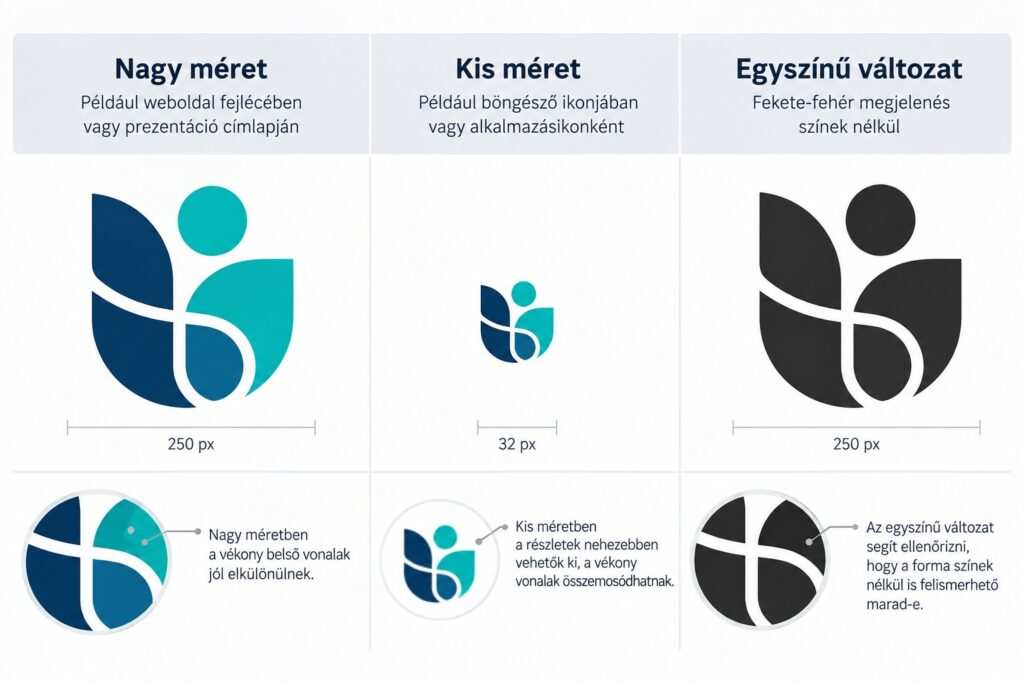
The most promising version should be tested at several sizes and on several surfaces, for example in a website header, in a presentation or as a tiny icon. It is also worth checking a black-and-white version to see whether the logo remains recognisable without colour. If smaller details disappear or blur together, the design needs simplifying.
The illustration below, which we created with the help of AI, shows a fictitious logo mark in three different displays. You can clearly see that the thin lines that remain distinct at a large size are hard to make out as a small icon. The single-colour version helps you judge how recognisable the mark is without colour. The illustration demonstrates general design considerations, not the performance of any specific AI tool.
Finalisation and approval
It is worth creating several versions of the chosen logo so it works well on different surfaces. These might include horizontal and stacked layouts, a standalone logo mark, and versions adapted for light and dark backgrounds. You should also define which version counts as final and where the editable source files are kept.
This prevents colleagues from working with inconsistent colours, incorrect proportions or outdated logo versions. If you want to use the logo long term as part of your company’s brand identity, it is worth involving a graphic designer in the final design and in setting the usage guidelines.
What file formats does a logo need?
For digital use, a PNG file with a transparent background is often sufficient, but in the long run it is worth producing a vector version too. This can be scaled without any loss of quality, so the logo stays sharp both as a small icon and on large signage. Bear in mind that a transparent background on its own does not mean the file is a vector file.
| Format | Typical use | Key points |
|---|---|---|
| PNG | Websites, presentations, documents | Can be used with a transparent background, but it is made of pixels, so quality may deteriorate when enlarged too much. |
| SVG | Websites, displays at various sizes, graphic editing | Vector elements scale without loss of quality, but the file may also contain an embedded raster image. |
| EPS or PDF | Graphic editing, print preparation and handover | They can contain vector graphics, but the file format alone does not guarantee suitability for print. |
If you only have a PNG file, saving it as an SVG does not by itself make the logo a vector graphic. That requires separate vectorisation, after which the shapes, outlines and lettering all need checking. Before using the logo in print, it is worth agreeing the required file formats and colour settings with the printer.
What should you watch out for when using an AI logo for business?
Just because you can download or buy an AI-generated logo does not necessarily mean you acquire exclusive rights to it or can register it as a trade mark. Commercial use, exclusivity and trade mark protection are separate legal questions, so it is worth clarifying them before making a final decision.
Canva, for example, points out that AI-generated content does not necessarily come with exclusive rights. It also grants only a non-exclusive licence for the stock graphics and logo templates available in the service, so according to Canva’s guidance these are not suitable as the basis for an exclusive trade mark. The situation is different for original graphics you create yourself, and for logos you assemble independently from simple shapes, lines and letters. Even in these cases, however, the conditions for obtaining trade mark protection need to be examined separately.
You also need to make sure the finished logo is sufficiently distinguishable from other businesses’ brand marks. To check for possible similarities, the public databases of the Hungarian Intellectual Property Office (SZTNH) and the SZTNH trade mark search can help. A simple image search, however, is no substitute for a trade mark law review, so for a significant, long-term brand investment it is worth consulting an expert.
In a corporate environment, it also makes sense to regulate the logo creation process. Define who may create new versions, who approves the final design and where the editable source files are stored. This way, the use of AI can become part of a controllable, consistent brand identity workflow. On ProMan Consulting’s AI training courses, participants can also learn which business tasks are worth applying artificial intelligence to, and when human review is needed.
Frequently asked questions
Do you need a design background to use an AI logo generator?
Not necessarily for creating the first versions. Judging the shape, legibility and fit with the brand, however, is a separate task. A simple interface therefore does not replace professional review of the final design.
Why is the brand name wrong in the generated logo?
In generative image creation, the lettering may differ from the requested text, so the name and any accents need to be checked separately. A practical solution is to create the mark without text and then add the name as editable text. This also makes later corrections easier.
Is it worth uploading an existing company logo as a reference?
Your own reference, provided you are entitled to use it, can help define the visual direction if the tool supports this. However, exact preservation of proportions and details is not guaranteed. For consistent use of an already approved logo, it is usually best to work from the existing source file.
Do you keep the logo if your subscription ends?
That depends on the terms of the service and the package purchased. Using a previously downloaded file, downloading it again and editing it further are separate questions. According to Looka’s offer, the rights associated with a purchased logo are retained even after the Brand Kit subscription ends. This is a provider statement relating to the logo design as a whole: it does not mean exclusivity over the individual built-in symbols, and it is no substitute for trade mark protection. The terms of other tools must be checked separately.
Is an AI logo enough for a complete brand identity?
The logo is one element of a brand identity. A consistent look also requires a colour system, typography, layout principles and consistent application. A well-chosen mark can support the brand when the same colours, typefaces and shapes appear consistently on the website, business cards and presentations.
In summary
An AI logo generator can provide a quick starting point for visual brainstorming and for comparing design directions. A usable end result, however, requires a clear brief, testing on several surfaces, the right files and clarified terms of use. The right choice is the solution your team can genuinely build on and whose result fits the brand’s goals.
Would you like to use artificial intelligence more effectively in your organisation’s creative and business tasks? Discover ProMan Consulting’s AI Strategy in Practice training, or get in touch with us, and we will help you find the training that suits your organisation’s needs.
